PARASEQ
Infect your sounds. Draw your chaos. Make everything move.
v1.0 · Modulator · Ableton Live 11+ · Max for Live · FREE
01 / THE INSTRUMENT
INTERFACE
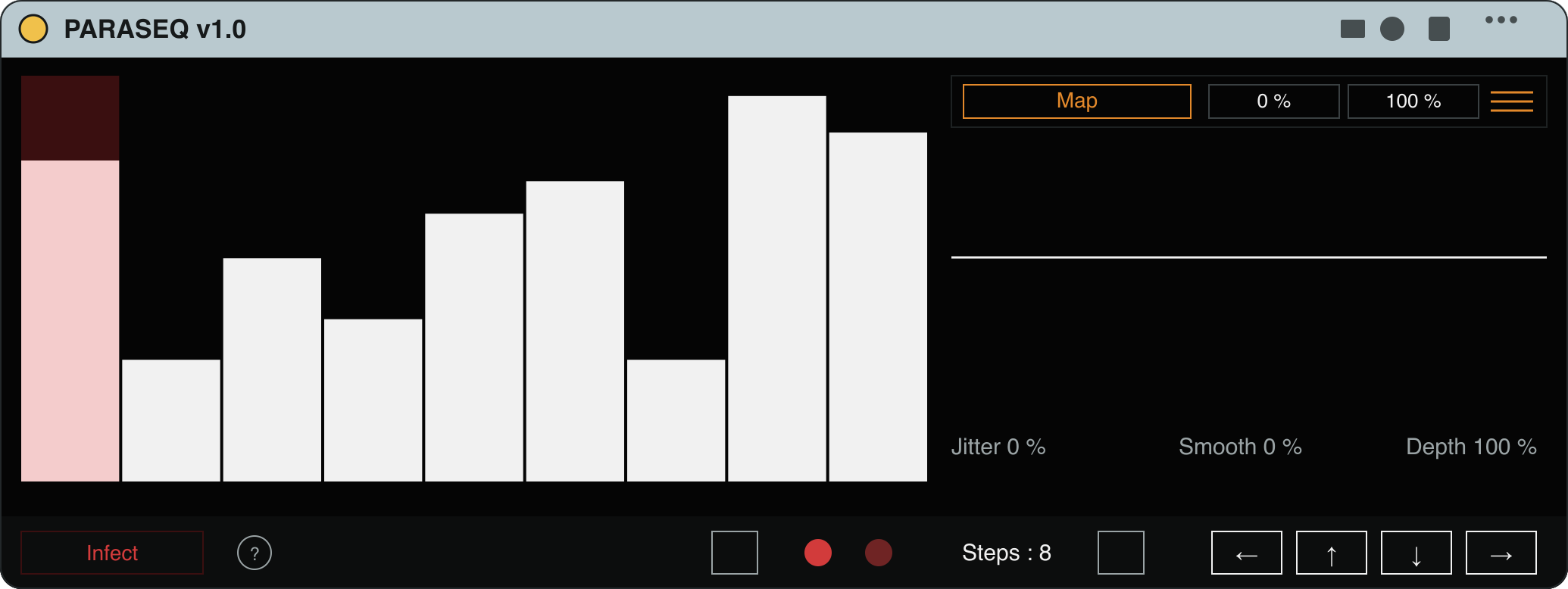
PARASEQ v1.0, a step-sequencer modulator with an Infection Engine, running as a Max for Live device in Ableton Live.
- Step Editor
- Draw the modulation curve. Drag steps up or down to shape ramps, spikes, pulses and staircases.
- Output Scope
- A real-time view of the live signal being sent out, reflecting Smooth, Jitter, and pattern changes.
- Map · Min · Max
- Learn any parameter on any device, then constrain its movement with a Min % / Max % window.
- Infect
- One click scans the selected device and auto-maps movement across up to 8 of its parameters.
- Steps
- Set the active sequence length. Fewer steps cycle faster at the same tempo.
- Jitter · Smooth · Depth
- Add randomness, blend hard jumps into smooth glides, and set the overall modulation intensity.
02 / WHAT IT'S FOR
INDICATIONS
A step-sequencer modulator with an Infection Engine that auto-maps movement to entire Live devices in one click.
- Animated synths and pads that breathe without manual automation
- Rhythmic gating and chopping without dedicated gate plugins
- Sound-design exploration via Reinfect for instant variation
- Live-performance modulation captured by hand (gesture recording)
03 / TRY IT
LIVE · NO INSTALL REQUIRED
Draw a pattern on the bench.
A taste of the Step Editor. Drag the steps and watch the output move. The real device maps this motion onto any parameter in your Live set.
Draw a shape in the editor. The output scope plays it back as a modulation signal. Smooth rounds the steps, Jitter adds drift, Depth sets how far it reaches. Hit Infect: one source now drives several device parameters at once. Reinfect reshuffles which ones move. Press Hear it to put the signal on a filter and listen to the shape you drew.
04 / HOW IT WORKS
PROCEDURE
- 01
Drag PARASEQ onto any track
- 02
Click the device you want to modulate
- 03
Hit Infect
- 04
Press play
Full install guide, every parameter, mapping modes, and recipes are in the PARASEQ documentation.
05 / SPECIFICATION
SPEC SHEET
- NAME
- PARASEQ
- CLASS
- Modulator
- VERSION
- 1.0
- HOST
- Ableton Live 11+ · Max for Live
- RELEASED
- 2026
- LICENSE
- Free · Personal & commercial use
FUNCTION
A step-sequencer modulator with an Infection Engine that auto-maps movement to entire Live devices in one click.
INDICATIONS
- Animated synths and pads that breathe without manual automation
- Rhythmic gating and chopping without dedicated gate plugins
- Sound-design exploration via Reinfect for instant variation
- Live-performance modulation captured by hand (gesture recording)
CONTRAINDICATIONS
- Not a sound source. PARASEQ modulates other devices and produces no audio on its own.
PROCEDURE
- 01Drag PARASEQ onto any track
- 02Click the device you want to modulate
- 03Hit Infect
- 04Press play
NOTES
Stack multiple instances for multi-layered modulation across an entire session.
06 / QUESTIONS
OPERATING NOTES
- Is PARASEQ free?
- Yes. PARASEQ v1.0 is free for personal and commercial use. Download it on Gumroad, no payment required.
- What is the Infection Engine?
- Click a device, hit Infect, and PARASEQ auto-maps modulation across up to eight of its continuous parameters at once. Reinfect reshuffles which parameters move, so it is the same device with different motion.
- What do I need to run PARASEQ?
- Ableton Live 11 or higher with Max for Live (included in Live Suite, or available as a paid add-on). It runs on both macOS and Windows.